Sitecore® 10 Certified Developer

I am thrilled to announce that I have officially passed the Sitecore 10 Developer Certification! 🎓 This achievement is a testament to my hard work, commitment, and dedication to providing top-notch digital solutions for my clients.

As a Sitecore Certified Developer, I possess the knowledge and skills necessary to build and maintain robust Sitecore solutions that drive business growth and deliver exceptional customer experiences. I am excited to apply this expertise to help my clients achieve their digital goals.

I would like to thank the Sitecore community for providing valuable resources and support throughout my journey towards certification. I look forward to continuing to learn and grow as a Sitecore developer and contribute to the community.

PowerShell ISE in Sitecore to populate data in your meta tags

Hello guys,

Today I wrote my first PowerShell script and it felt amazing. The power of this module in Sitecore is pure genius. It lets you handle large bulk updates in the matter of seconds.

One of our requirements was to complete the Meta Tags of the entire website.

If you can imagine to go page by page it could take a day or more for one person and the risk of doing something wrong increases with the page number.

Luckily we have PowerShell ISE and it works like a charm.

<$homeItem = Get-Item -Path 'master:\content\home'       $allPagesThatHaveMetaTags = $homeItem | Get-ChildItem -recurse | Where-Object {$_.MetaDescription -ne $null }

In the allPagesThatHaveMetaTags we have all items that contain the field the MetaDescription.

Now it a foreach we can go item by item and update the MetaDescription field:

$allPagesThatHaveMetaTags | ForEach-Object {
$pageDescription = 'default meta tag description in case of no article body'
$metaDescriptionItem = 'default text'                                
if($_["Text"] -ne $null -and $_["Text"] -ne '')
{
$pageDescription = $_["Text"];
$metaDescriptionItem = 'Text field on the same item';
}

$_.Editing.BeginEdit()
$_["MetaDescription"] = $pageDescription
$_.Editing.EndEdit()

Write-Host 'Item with name ' + $_.Name + 'and ID' + $_.ID + 'has been updated with metadescription from ' + $metaDescriptionItem
}

Whith the &metaDescriptionItem I am creating a log list so I can know which items have default description and which have from the TEXT field.

Regards,

VP


Future publish in Sitecore Part 1

Hello,

I think all of us tried this at some point looking at out of the box features and surprise surprise you cannot do it 🙂

So here is my approach and it is a very simple one which can be extended in a much more complex piece of code but for my requirements it will do.

I have created a cs file with the code:  AutomatedPublish (not sure if its a English word)

public class AutomatedPublish
{
public void FuturePublish(Item[] items, Sitecore.Tasks.CommandItem command, Sitecore.Tasks.ScheduleItem schedule)
{
foreach (var item in items)
{
// The publishOptions determine the source and target database,
// the publish mode and language, and the publish date
Sitecore.Publishing.PublishOptions publishOptions = new Sitecore.Publishing.PublishOptions(
item.Database,
Database.GetDatabase("web"),
Sitecore.Publishing.PublishMode.SingleItem,
item.Languag,System.DateTime.Now);

// Create a publisher with the publishoptions
Sitecore.Publishing.Publisher publisher = new Sitecore.Publishing.Publisher(publishOptions);

// Choose where to publish from
publisher.Options.RootItem = item;

// Publish children as well?
publisher.Options.Deep = false;

// Do the publish!
publisher.Publish();
}
}
}

In sitecore you will have to create the command in the System -> Tasks -> Commands.

Continue reading

Sitecore fun fact #2

Hello,

Publish with related item will not publish the children of the related item.

Example: Carousel item on the homepage which has a data source a item from a bucket.

  • Homepage Carousel
    • Slide 1
    • Slide 2
    • Slide 3

If you publish your home page with related items but your changes are only on the slides SURPRISE it won’t publish the slides.

This can be easly fixed with a custom pipeline.

Just replace the sitecore existing pipeline code with your custom -> Sitecore.Publishing.Pipelines.GetItemReferences.AddItemLinkReferences


public class AddItemLinkReferences : GetItemReferencesProcessor -> GetReferences()
private System.Collections.Generic.IEnumerable<Item> GetReferences(Item item, bool sharedOnly)
{
Assert.ArgumentNotNull(item, "item");
System.Collections.Generic.List<Item> list = new System.Collections.Generic.List<Item>();
ItemLink[] source = item.Links.GetValidLinks();
source = (from link in source
where item.Database.Name.Equals(link.TargetDatabaseName, System.StringComparison.OrdinalIgnoreCase)
select link).ToArray<ItemLink>();
if (sharedOnly)
{
source = source.Where(delegate(ItemLink link)
{
Item sourceItem = link.GetSourceItem();
return sourceItem != null && (ID.IsNullOrEmpty(link.SourceFieldID) || sourceItem.Fields[link.SourceFieldID].Shared);
}).ToArray<ItemLink>();
}
System.Collections.Generic.List<Item> list2 = (from link in source
select link.GetTargetItem() into relatedItem
where relatedItem != null
select relatedItem).ToList<Item>();
  System.Collections.Generic.List<Item> list3 = new List<Item>();
            foreach (var itemS in list2)
            {
                list3.Add(itemS);
                if (itemS.HasChildren)
                {
                    list3.AddRange(itemS.Children);
                }
            }
            foreach (Item current in list3)
            {
                list.AddRange(PublishQueue.GetParents(current));
                list.Add(current);
            }
return list.Distinct(new ItemIdComparer());
}

I am open for suggestions if you have a better solution.

Thank you,

Vio

Sitecore fun fact #1

Hello,

I came across this funny fact today:

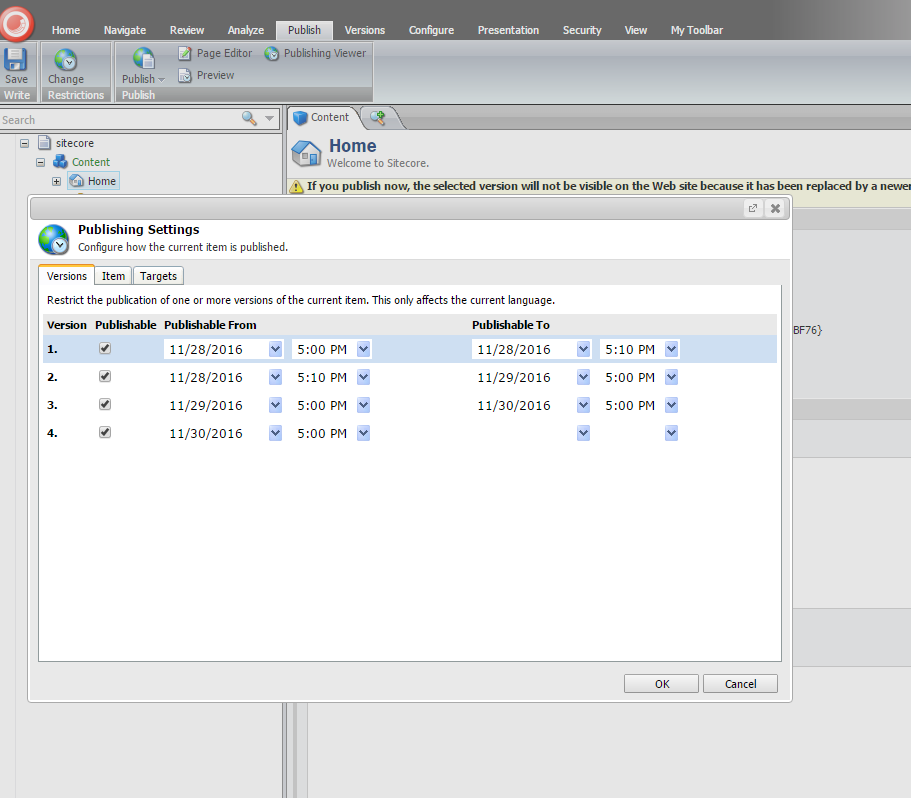
  1. If a parent item has an unpublished date set up, lets say today and you save the setting but you don’t publish the change to the web.
  2. Then you go to a child item and publish it.It will delete everything that sits under the parent item to the child but it will not show any warning message like: the version you try to publish will be not displayed. Is life fare ?!?! I don’t know. But it should be some kind of message(my opinion!?).
  3. The only error you will get is this “layout not found” which will make you crazy and will force you to start republishing layouts and sublayouts and eventually punch the monitor 🙂 (which I did, but this may not apply to all)

VP

LinkedIn Plug-In

Hello guys,

Requirement: Show the LinkedIn button for a User that has the link set up in the DB or in Sitecore.

  1. First of all you can check out the LinkedIn Developer for what type of button you need and get the snippet code by clicking Get It. Really easy.
  2. I like this button sleek and cool https://developer.linkedin.com/plugins/member-profile-plugin-generator?button-type-logo-name=true
  3. From the box you can choose different actions for your button
  4. Then set a field in sitecore or set a field in the DB wherever you need it and a field for the name.
  5.  I have added this in my html page:

<script src=”//platform.linkedin.com/in.js” type=”text/javascript”></script>
<script type=”IN/MemberProfile” data-id=”<%= LinkedInUrl%>” data-format=”hover” data-text=”<%= FullName%>”></script>

Continue reading

“Add to home screen” website image

Hi guys,

A cool thing you can do with your website is to set the links which appear as shortcuts on your iPhone or iPad when you press “Add to home screen”.

This is a very cool feature if you have responsive design websites that people use constantly from devices.

Yes Apple is awesome. 🙂

Requirements: I would like to be able to change the images that appear when I use the feature “Add to home screen” my website on apple devices.

Continue reading